UI Composition with SAP Application Frontend Service
Share UI code at runtime, extend apps without touching source, and build mashups using SAP Application Frontend Service — no CORS issues or extra hops.
Table of Contents
Every UI team eventually hits the same wall: the same header component, the same error pages, the same authentication helper gets copy-pasted into application after application. When the shared logic changes, every copy has to be updated and every application redeployed.
The traditional answers — shared NPM packages, a CDN-hosted module, a server-side proxy — all have real costs. Packages still require a rebuild and redeploy cycle. CDN hosting introduces CORS and Content Security Policy complexity. Server-side proxies add an extra network hop for every resource request.
SAP Application Frontend Service (AFS) solves this differently. Its routing engine can resolve resources from one application through the URL space of another — at the server side, before the browser is involved. The result is a form of runtime composition that inherits none of the traditional downsides.
The Traditional Approaches and Their Tradeoffs
Before looking at what AFS enables, it helps to name what it replaces:
Development time (copy-paste): Each application carries its own copy of shared files. Any change requires patching and redeploying every consumer. Application bundles grow with duplicated code.
Build/deploy time (NPM packages): Shared logic lives in one place, but consuming applications must be rebuilt and redeployed whenever the package version changes. Release ordering becomes a dependency problem.
Runtime via client-side URL: Eliminates code duplication. But CORS restrictions, CSP headers, and session management across origins add significant complexity, especially in SAP landscapes where identity propagation matters.
Runtime via server-side proxy: Avoids CORS issues by keeping everything on the same origin. But every resource request passes through an extra network hop — the proxy has to fetch from the remote host on every call.
AFS’s routing-based approach is technically in the server-side runtime category, but it eliminates the extra network hop. Since AFS is aware of all deployed applications in the subaccount, it resolves application-to-application routes internally without making outbound HTTP requests.
How Application-to-Application Routing Works
In AFS, each application has an xs-app.json that maps URL patterns to sources. The source property is a regular expression. The service property routes to the application’s own static files. The application property routes to another AFS application by name.
When a browser requests a resource that matches a route with "application": "mylib", AFS resolves that internally — it looks up mylib in the subaccount’s deployed applications, finds the matching resource, and serves it as if it were part of the consuming application. The browser sees one origin throughout.
This makes three distinct composition patterns possible.
Use Case 1: Reusable Application / Component
When to use it: You want to share common UI logic — an error page, a reusable component library, a shared utility — across multiple applications, and you want those consumers to pick up updates automatically without being redeployed.
The consuming application’s xs-app.json adds a route with an "application" property that points to the shared library by name (optionally pinned to a version with @). The route’s source pattern matches the paths used by the shared resource. Routes for the reusable application are placed before the catch-all route for the consuming application’s own static files.
{
  "errorPage": [
    { "status": [404], "path": "/error/404.html" }
  ],
  "routes": [
    {
      "source": "^/error/(.*)",
      "target": "/common/$1",
      "application": "mylib@1.0.0"
    },
    {
      "source": "^(/|/index.html)$",
      "target": "/index.html",
      "service": "app-front"
    },
    {
      "source": "/assets/.*",
      "service": "app-front"
    }
  ]
}
This configuration assumes a second AFS application with "sap.app/id": "mylib" deployed in the same BTP subaccount. That application has its own xs-app.json:
{
  "routes": [
    {
      "source": "^/common/(.*)",
      "target": "/dist/$1",
      "service": "app-front"
    }
  ]
}
A browser request for /error/404.html on the consuming application resolves through AFS to /dist/404.html in mylib. Follow-up requests from the error page — illustrations, stylesheets, scripts — load from mylib automatically as long as they use relative paths. No rebuild or redeploy of the consuming application is required when mylib is updated.
Key point: The shared library application requires no special configuration in its xs-app.json or manifest.json to be reusable. Any AFS application can participate.
Use Case 2: Application Extension
When to use it: You need to create a modified version of an existing application — changing a view, overriding a controller — but you cannot or should not modify the original application’s source code. End users access both the original and the extended version through separate URLs.
The extension application inverts the reusable application pattern. Its xs-app.json places a catch-all route that delegates to the original application, and puts specific override routes before it:
{
  "routes": [
    {
      "source": "^/view/App.view.xml",
      "service": "app-front"
    },
    {
      "source": ".*",
      "application": "original"
    }
  ]
}
The extension application itself contains only the files that differ from the original — in this example, a modified App.view.xml. Every other resource (controllers, models, other views, assets) is served from the original application via the catch-all. The original application is never touched.
This is particularly useful in SAP landscapes where partner or customer extensions must not modify the base application’s delivery package. The extension lives in its own deployment lifecycle.
Use Case 3: UI Mashup
When to use it: You want to compose multiple independent applications into a single unified experience, served under one URL, without creating a new monolithic application that bundles all the UI code.
A mashup application combines the previous two patterns: it extends a base application by delegating most routes to it, but its overrides themselves point to other applications rather than hosting static files directly. The mashup’s own xs-app.json and manifest.json are its only artifacts.
{
  "routes": [
    {
      "source": "^/apps.json",
      "destination": "apps"
    },
    {
      "source": "^/app/(.*)",
      "application": "$1"
    },
    {
      "source": ".*",
      "application": "preview"
    }
  ]
}
In this example, a preview shell application is the base. The mashup replaces its static apps.json file with a dynamic backend response (via the apps destination), and dynamically resolves any embedded application by name from the URL path. A request for /app/mymodule causes AFS to look up the mymodule application in the subaccount and serve it within the preview shell’s context.
The mashup has no UI artifacts of its own. Its entire composition is defined in two JSON files.
Visibility and Dependency Tracking
Application-to-application relationships are first-class metadata in AFS. The BTP Cockpit shows a dependency graph for each application version — which applications it depends on and the live availability status of each dependency.
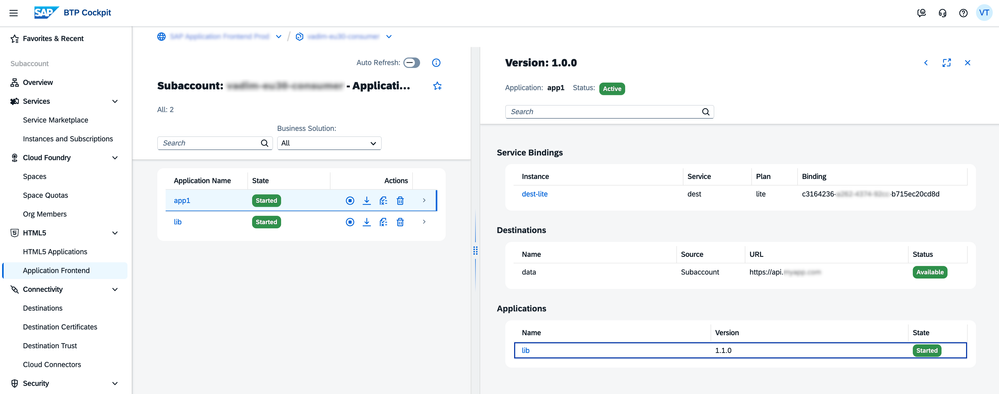
If a reusable application is stopped or a required version is undeployed, the dependency graph surfaces it immediately. This visibility is available through the BTP Cockpit UI, the AFS CLI, and the AFS API — so it can be integrated into deployment pipelines and health checks.
Key Benefits
| Benefit | Detail |
|---|---|
| No required release order | Consuming applications do not need to be redeployed when the shared application is updated. Shared applications can be released and updated independently. |
| No CORS or CSP configuration | The browser treats reused resources as part of the consuming application. There is no cross-origin relationship to manage. |
| Shared session | The same user session applies across consuming and reusable applications. There are no orphaned sessions or “zombie” sign-ins when a user logs out. |
| No extra network hops | AFS resolves application-to-application routes internally. It does not make outbound HTTP requests to itself for each resource. |
| No extensibility points required | Base applications do not need to declare hooks, extension APIs, or any upfront preparation. Any AFS application can be reused, extended, or composed into a mashup out of the box. |
Relationship to HTML5 Application Repository
HTML5 Application Repository and Application Frontend Service will continue to coexist. No HTML5 Repository sunset is planned. Both are supported, but new features — including application-to-application routing — are available in AFS only.
There is an interoperability path: HTML5 Repository applications modelled as business services with UI can be reused in AFS applications. The reverse (reusing AFS applications inside HTML5 Repository applications) is not supported.
If you are starting a new project, AFS is the recommended choice. If you have existing HTML5 Repository applications, they remain fully supported and the interoperability option allows gradual migration.
Summary
AFS’s application-to-application routing makes three composition patterns practical without the traditional tradeoffs:
- Reusable Application — share components across consumers; consumers update automatically without redeployment
- Application Extension — override specific files in an existing application without touching its source
- UI Mashup — compose multiple independent applications under one URL using only configuration
All three patterns resolve at the AFS routing layer, before the browser is involved. The result is runtime composition with development-time simplicity.
Omar Hassan
SAP BTP Platform Specialist
Dubai-based BTP platform specialist helping teams modernise their frontend delivery on SAP Application Frontend Service. Focuses on UI composition, lifecycle governance, and reducing operational overhead in multi-application landscapes.