Centralized Error Handling in SAP Cloud Integration with Exception Subprocess
A step-by-step guide to building a reusable central error logger in SAP CPI using Exception Subprocess, ProcessDirect, and HTML email alerts.
Table of Contents
In SAP Cloud Integration, runtime errors are a fact of life. Script failures, adapter misconfigurations, unexpected message payloads — any of these can break an integration flow at any time. The standard response is to add error handling directly to each iFlow, which works initially but leads to duplicated logic that becomes difficult to maintain as the integration landscape grows.
A centralised approach is more robust. Rather than handling errors at the point of failure, each business iFlow captures the error details and forwards them to a single dedicated logger, which normalises the data and sends notifications consistently regardless of where the error originated.
This guide walks through that pattern end to end: an Exception Subprocess captures the error in the business iFlow, the ProcessDirect adapter forwards it to a central logger, and the logger sends a styled HTML email to the support team.
Solution Overview
The pattern uses two types of integration flows working together.
Business Integration Flows
- Execute business logic
- Use an Exception Subprocess to capture errors
- Forward error details to the central logger via ProcessDirect
Central Error Logger Integration Flow
- Receives error messages from any number of business iFlows
- Normalises data with fallback handling for missing values
- Sends formatted HTML email notifications
Step 1: Create the Business Integration Flow
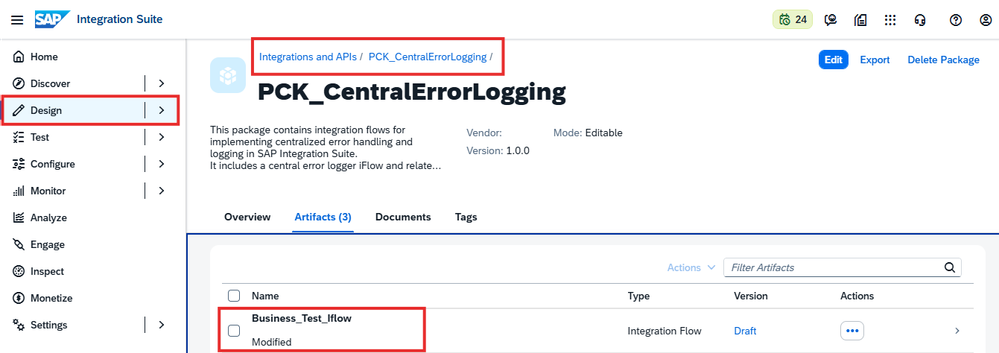
- Navigate to SAP Integration Suite
- Go to Design → Integrations and APIs
- Create a new package — for example:
PCK_CentralErrorLogging - Create a new Integration Flow named
Business_Test_Iflow
This iFlow represents a sample business process that will deliberately throw a runtime exception for testing purposes.
Step 2: Configure the Sender and Main Process
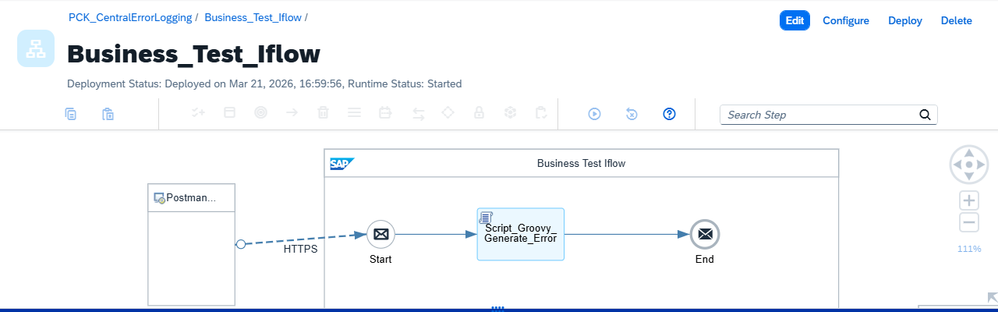
- Add an HTTPS Sender Adapter with endpoint address
/testErrorand configure authentication as required - Connect the adapter to the Start Event
- Add a Groovy Script named
Script_Groovy_Generate_Error— this script intentionally throws an exception - Connect the script to the End Event
Step 3: Add an Exception Subprocess for Error Capture
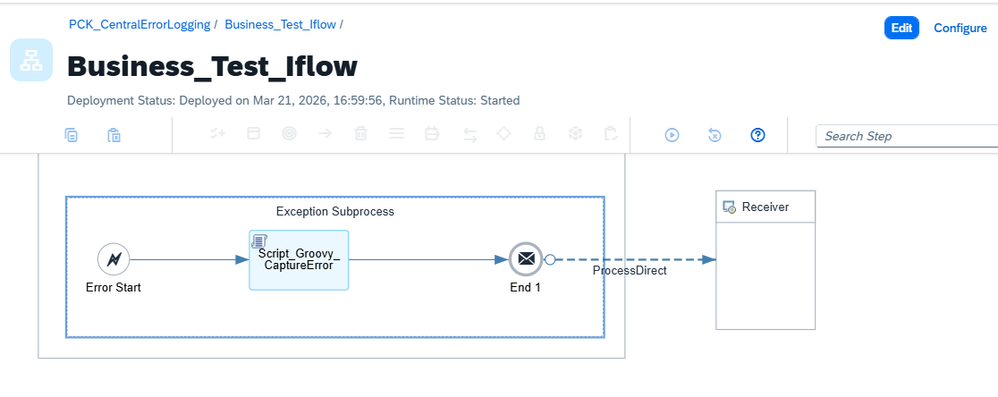
- Add an Exception Subprocess to the Business iFlow
- Inside the subprocess, add a Groovy Script named
Script_Groovy_CaptureError
This script captures the following and stores each as a message property:
| Property | Purpose |
|---|---|
| Integration flow name | Identifies which iFlow failed |
| Message ID | Unique identifier for the failed message |
| Correlation ID | Enables tracing across systems |
| Error message | The exception text from the runtime |
| Timestamps | Both IST and UTC for global teams |
The Exception Subprocess is the key design element: it intercepts runtime errors at the iFlow level without requiring any changes to individual processing steps, which is precisely what makes this pattern reusable across an entire landscape.
Step 4: Forward via ProcessDirect Adapter
After the capture script:
- Add a ProcessDirect Receiver Adapter
- Set the address to
/centralErrorLogger
Any number of business iFlows can forward to the same address — this is what makes the logger truly reusable with no per-iFlow configuration.
Step 5: Create the Central Error Logger Integration Flow
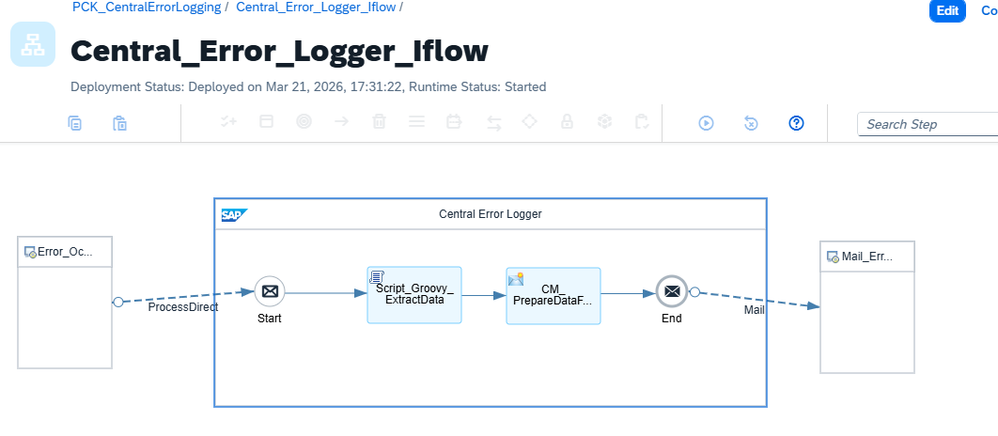
- Create a new integration flow named
Central_Error_Logger_Iflow - Set the Sender Adapter to ProcessDirect
- Use the same address:
/centralErrorLogger
Step 6: Normalise Incoming Error Data
Add a Groovy Script as the first step in the logger. This script reads error details from message properties, headers, or payload and applies sensible fallback values when any field is missing. The result is a consistent, complete data structure for the email formatter regardless of what the calling iFlow provided.
This step is what makes the logger robust — senders do not need to guarantee a complete property set.
Step 7: Format Error Details as HTML
- Add a Content Modifier
- Build an HTML table in the message body containing: Integration Flow Name, Message ID, Adapter Type, Error Message, Timestamp (IST and UTC), and Correlation ID
Step 8: Configure the Mail Receiver Adapter
- Add a Mail Receiver Adapter
- Configure: mail server details, sender address, recipient addresses, and email subject
- Set the MIME type to
text/html— this is essential for the HTML table to render correctly in email clients
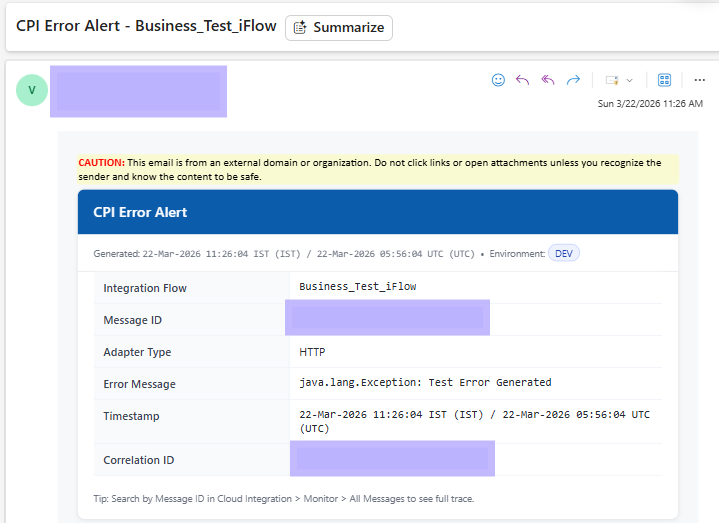
Step 9: End-to-End Testing
- Deploy both integration flows
- Trigger the business iFlow via its HTTP endpoint (Postman or curl works fine)
- Verify in Monitor → All Messages that the business iFlow reached a completed status
- Confirm the Central Error Logger received and processed the error
- Check that the HTML email arrived with all fields populated
Validating with a Complex Integration Flow
The same pattern was validated against Invoice_Batch_Email_Processor_With_ProcessDirect — a more complex iFlow featuring multiple processing steps, routers based on message severity, multiple email notification paths, and a combination of Groovy scripts and content modifiers.
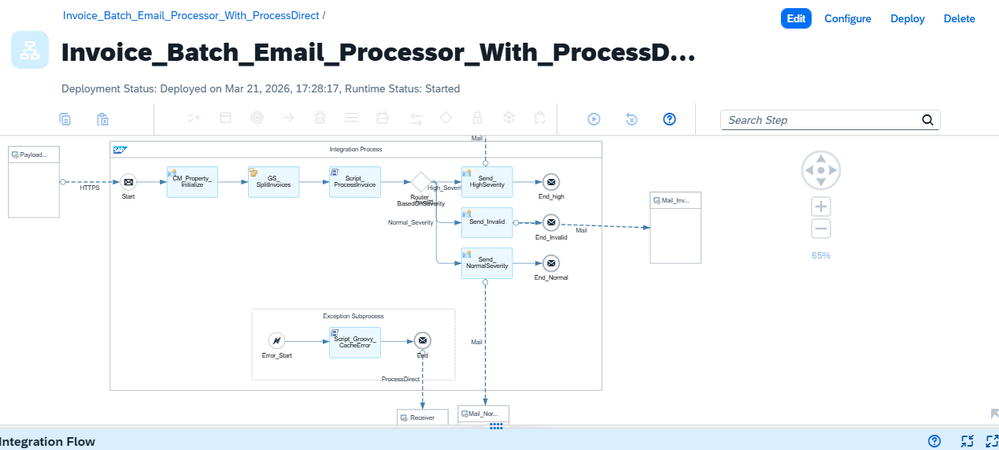
Key results from the validation:
- The Exception Subprocess captured runtime errors correctly in the complex flow
- No changes were made to the Central Error Logger iFlow — it processed errors from both senders identically
- HTML email alerts were generated correctly for both scenarios
![HTML email notification titled CPI Error Alert for Invoice_Batch_Email_Processor_With_ProcessDirect showing error message 'Unexpected EOF in prolog at [row,col {unknown-source}]: [1,0]'](/images/cpi-centralized-error-handling/email-alert-invoice.png)
Benefits of This Approach
| Benefit | Detail |
|---|---|
| Centralised handling | Error logic lives in one place, not scattered across every iFlow |
| Reusability | Adding error handling to any iFlow requires only an Exception Subprocess and a ProcessDirect call |
| Clean separation | Business logic and error handling are independently deployable and maintainable |
| Faster troubleshooting | Message ID and Correlation ID in every email link directly to the monitor trace |
| Consistent notifications | Uniform HTML format regardless of which iFlow generated the error |
| Production-tested | Validated against both simple and complex real-world iFlow designs |
Conclusion
By combining the Exception Subprocess with a ProcessDirect-connected central logger, SAP Cloud Integration landscapes become significantly easier to maintain and monitor. The upfront effort of building the central logger pays back quickly in any landscape with more than a handful of active iFlows — and adding error visibility to new iFlows becomes a matter of minutes, not hours.
All screenshots in this guide are from real execution against SAP Integration Suite.
Priya Sharma
SAP Basis & Technical Specialist
Based in Bengaluru with expertise in SAP Basis administration, S/4HANA migrations, and system landscape design. Passionate about making technical SAP topics accessible.