Immutable Kafka Topic Routing in SAP CPI Using ODCP and Value Mapping
Route multiple Kafka topics through a single immutable iFlow in SAP CPI using the ODCP pattern, Value Mapping metadata, and Groovy AVRO deserialization.
Table of Contents
When teams start bringing Kafka into SAP Cloud Integration, the instinctive approach is one iFlow per topic. A Sales O2C domain with five event types gets five iFlows, five deployments, and five independent maintenance points. Add a new event or rename a topic and you need a developer, a change request, and a deployment window.
There is a better pattern — and it is the same pattern that already works for IDoc routing in SAP PI/PO and SAP CPI: one adapter, one router, one Value Mapping that grows. The iFlow never changes. Only the metadata does.
This article walks through that pattern end to end: one Kafka Sender Adapter listening to all topics in a domain, a Groovy script that looks up the target channel from a Value Mapping, a router that dispatches to domain-specific processing iFlows, and an AVRO deserialization script that keeps schema changes outside the code.
The Problem with One iFlow Per Topic
Consider a Sales O2C domain with topics like acme.sales.o2c.order.created, acme.sales.o2c.order.confirmed, acme.sales.o2c.order.cancelled, and acme.sales.o2c.invoice.created.
The conventional approach creates one iFlow per topic. Each iFlow has its own Kafka Sender Adapter, its own credential binding, and its own deployment lifecycle. When business requirements change:
- A new event type → new iFlow + new adapter config + new deploy
- A topic rename → every adapter that references it must be updated and redeployed
- A schema change → every script that references field names must be updated
The alternative is to treat the Kafka router iFlow the same way ODCP treats IDoc routing: immutable. The iFlow never changes. The Value Mapping is the live catalog of what the domain knows and processes.
Architecture Overview
The pattern has two layers.
Layer 1 — Kafka Receiver Layer (Immutable)
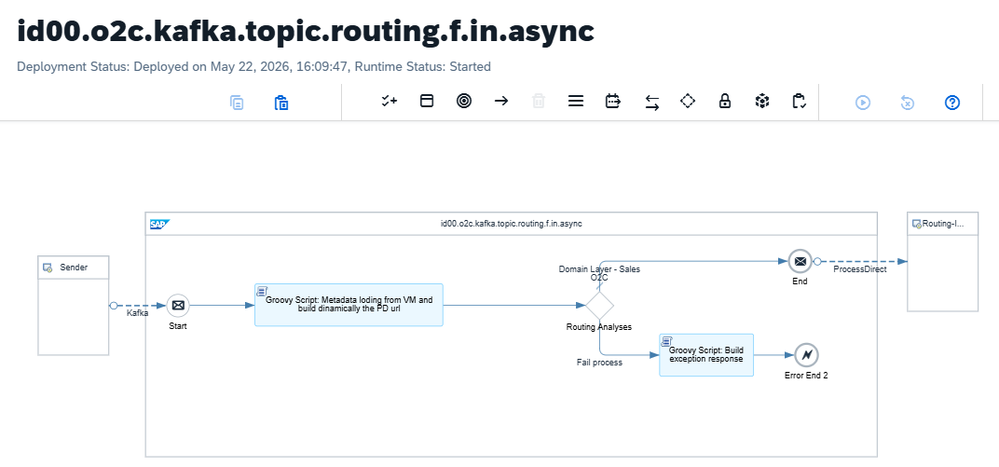
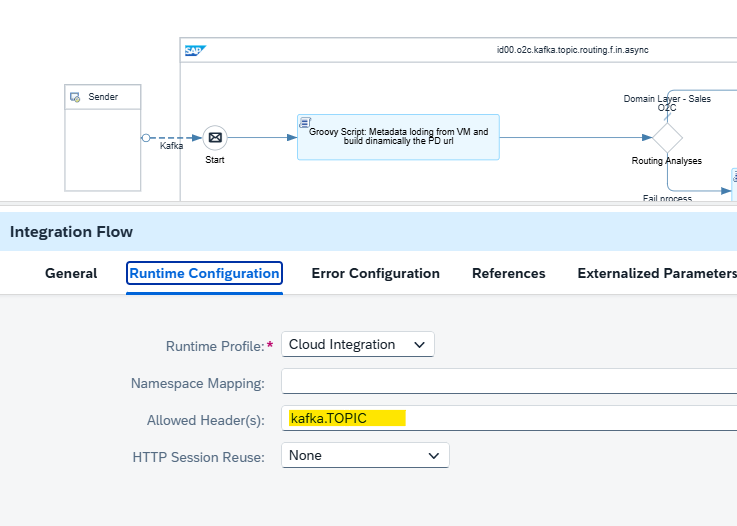
One iFlow. One Kafka Sender Adapter. The adapter subscribes to all topics in the domain using a comma-separated list or wildcard pattern. A Groovy script reads the kafka.TOPIC header, performs a Value Mapping lookup, and sets a target_channel property. A content-based router dispatches the message to the correct processing iFlow via ProcessDirect. If the topic has no mapping, the router sends a structured JSON error response rather than failing silently.
Layer 2 — Domain Processing Layer (Independently Owned)
One iFlow per event type, each listening on its own ProcessDirect address. Each iFlow owns its AVRO deserialization, message mapping, retry policy, DLQ configuration, and output adapter. These iFlows evolve independently. Adding a new event type never requires touching Layer 1.
The architectural invariant: the receiver layer is frozen. The domain layer evolves. A new event type adds one row to the Value Mapping and deploys one new processing iFlow. The router iFlow is never touched.
Value Mapping Configuration
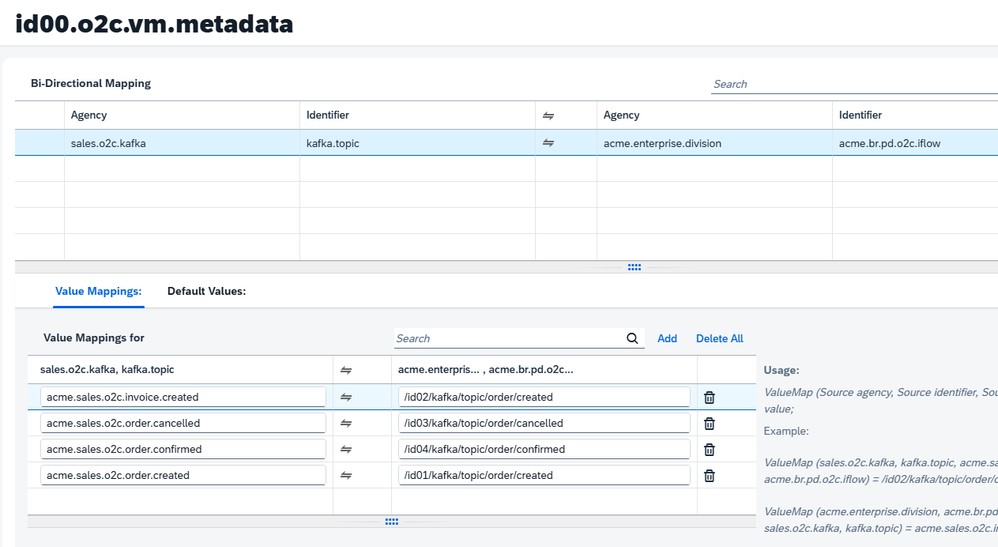
The Value Mapping artifact (for example, id00.o2c.vm.metadata) maps each Kafka topic name to a ProcessDirect address.
| Source Agency | Source ID | Source Value | Target Agency | Target ID | Target Value |
|---|---|---|---|---|---|
sales.o2c.kafka | kafka.topic | acme.sales.o2c.order.created | acme.enterprise.division | acme.br.pd.o2c.iflow | /id01/o2c/order/created |
sales.o2c.kafka | kafka.topic | acme.sales.o2c.order.confirmed | acme.enterprise.division | acme.br.pd.o2c.iflow | /id02/o2c/order/confirmed |
sales.o2c.kafka | kafka.topic | acme.sales.o2c.order.cancelled | acme.enterprise.division | acme.br.pd.o2c.iflow | /id03/o2c/order/cancelled |
sales.o2c.kafka | kafka.topic | acme.sales.o2c.invoice.created | acme.enterprise.division | acme.br.pd.o2c.iflow | /id04/o2c/invoice/created |
Adding a new event type is a single row in this table. No code. No deployment.
Setting Up the Kafka Sender Adapter
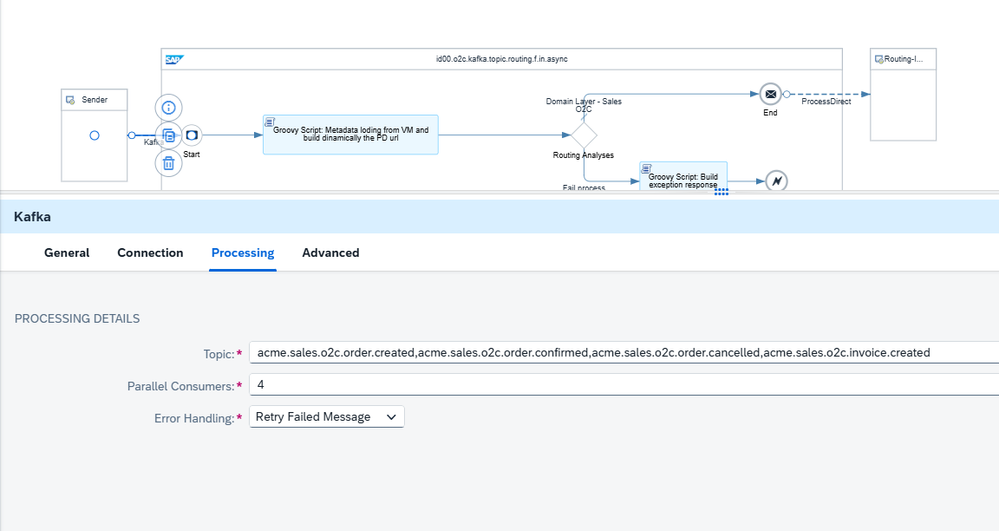
Create the router iFlow and configure the Kafka Sender Adapter. In the Topics field, enter all domain topics as a comma-separated list:
acme.sales.o2c.order.created,acme.sales.o2c.order.confirmed,acme.sales.o2c.order.cancelled,acme.sales.o2c.invoice.created
Wildcards are supported if the broker allows them (acme.sales.o2c.*).
Under Allowed Headers, add kafka.TOPIC. This is the header that carries the topic name at runtime and is the entire routing key. Without it, the script cannot identify which topic delivered the message.
Setting Up Confluent Cloud (Free Tier)
For testing, Confluent Cloud’s free tier is sufficient. Create a cluster, then create each topic that matches the domain naming convention.
Groovy Script 1 — The Router
This script runs in the router iFlow. It reads the kafka.TOPIC header, looks up the target channel in the Value Mapping, and sets properties that the downstream router uses to make its decision.
import com.sap.gateway.ip.core.customdev.util.Message
import com.sap.it.api.ITApiFactory
import com.sap.it.api.mapping.ValueMappingApi

def Message processData(Message message) {
    def vm_agency_src  = 'sales.o2c.kafka'
    def vm_id_src      = 'kafka.topic'
    def vm_agency_tgt  = 'acme.enterprise.division'
    def vm_id_tgt      = 'acme.br.pd.o2c.iflow'
    def fallback       = 'unknown'

    def props   = message.getProperties()
    def headers = message.getHeaders()

    def kafka_topic    = (headers['kafka.TOPIC'] as String)?.trim() ?: ''
    def target_channel = fallback
    def vm_error       = ''

    try {
        def vm_api = ITApiFactory.getApi(ValueMappingApi.class, null)
        def mapped = vm_api.getMappedValue(
            vm_agency_src, vm_id_src, kafka_topic,
            vm_agency_tgt, vm_id_tgt
        )
        if (mapped?.trim()) target_channel = mapped.trim()
    } catch (Exception e) {
        vm_error = e.message ?: 'unknown error'
    }

    props.put('target_channel', target_channel)
    props.put('is_mapped',      (target_channel != fallback).toString())
    props.put('vm_key',         kafka_topic)
    props.put('vm_error',       vm_error)
    headers.put('vm_key',       kafka_topic)
    return message
}
After the script, a content-based router checks the is_mapped property:
true→ send to${target_channel}via ProcessDirectfalse→ invokebuildErrorPayload()and return an HTTP 500 with a structured JSON error body
The error payload includes the topic name, the VM artifact, and a plain-language action_required message, making unmapped topics immediately actionable without digging through logs.
Groovy Script 2 — AVRO Deserialization in the Processing iFlow
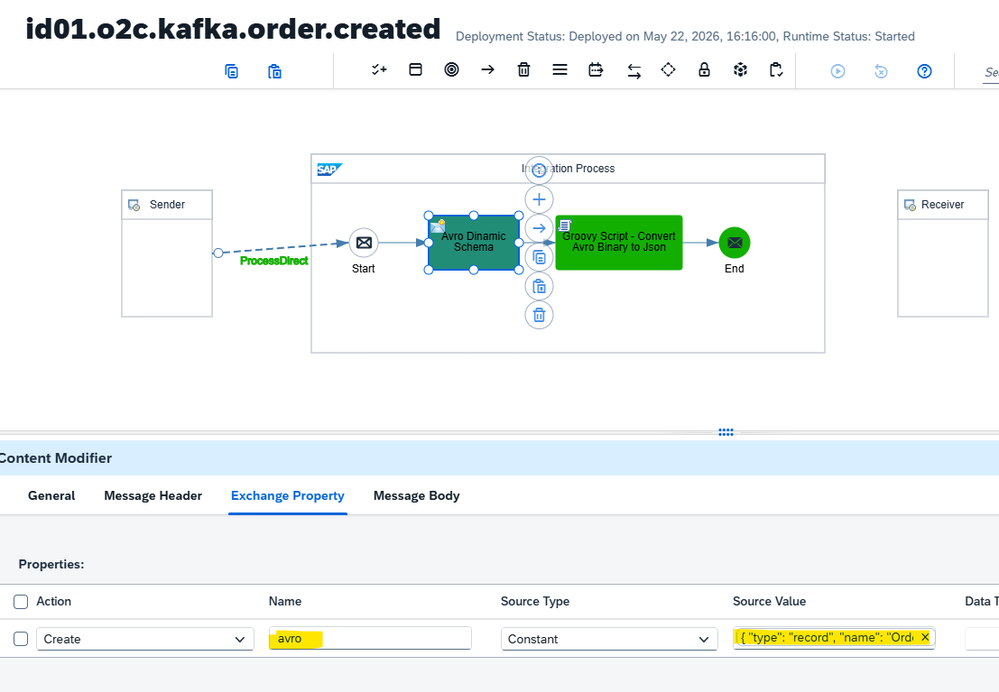
Each domain processing iFlow receives the raw Kafka message via ProcessDirect and must deserialize it from AVRO binary format. The AVRO schema is stored as a CPI Externalized Parameter — not hardcoded in the script. This is the critical design decision that keeps the processing iFlow immutable even as schemas evolve.
Externalized Parameter Setup
In the iFlow properties, add an externalized parameter:
| Name | Value |
|---|---|
avro | { "type": "record", "name": "Order", ... } (full AVRO schema JSON) |
When the schema changes, update the externalized parameter. The iFlow is not redeployed.
The Deserialization Script
import com.sap.gateway.ip.core.customdev.util.Message
import org.apache.avro.Schema
import org.apache.avro.generic.GenericDatumReader
import org.apache.avro.generic.GenericRecord
import org.apache.avro.io.DecoderFactory
import groovy.xml.MarkupBuilder

def Message processData(Message message) {
    // PRODUCTION: raw bytes from Kafka Sender Adapter
    byte[] rawBytes = message.getBody(byte[].class)
    // SIMULATION (Base64): byte[] rawBytes = Base64.getDecoder().decode(message.getBody(String.class))

    // Confluent Wire Format: strip 5-byte header (magic byte 0x00 + 4-byte schema ID)
    byte[] avroBytes = (rawBytes[0] == 0x00) ? rawBytes[5..-1] as byte[] : rawBytes

    // Schema from externalized parameter — iFlow remains immutable
    def schemaStr = message.getProperty("avro").toString()

    Schema schema     = new Schema.Parser().parse(schemaStr)
    def decoder       = DecoderFactory.get().binaryDecoder(new ByteArrayInputStream(avroBytes), null)
    def reader        = new GenericDatumReader(schema)
    GenericRecord rec = reader.read(null, decoder)

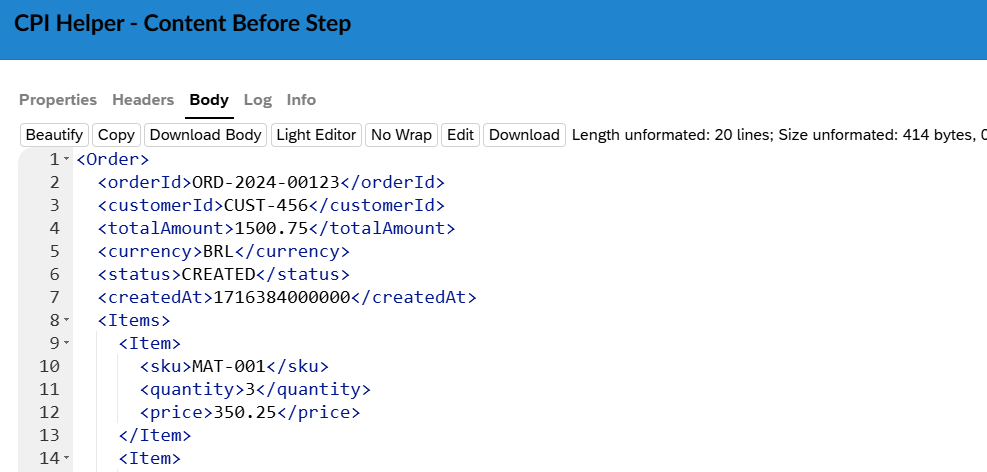
    // Map to XML output
    Writer writer = new StringWriter()
    def builder   = new MarkupBuilder(new IndentPrinter(writer, '  '))
    builder.Order {
        orderId     rec.get("orderId").toString()
        customerId  rec.get("customerId").toString()
        totalAmount rec.get("totalAmount")
        currency    rec.get("currency").toString()
        status      rec.get("status").toString()
        createdAt   rec.get("createdAt")
        Items {
            rec.get("items").each { item ->
                Item {
                    sku      item.get("sku").toString()
                    quantity item.get("quantity")
                    price    item.get("price")
                }
            }
        }
    }

    message.setBody(writer.toString())
    message.setHeader("Content-Type", "application/xml")
    return message
}
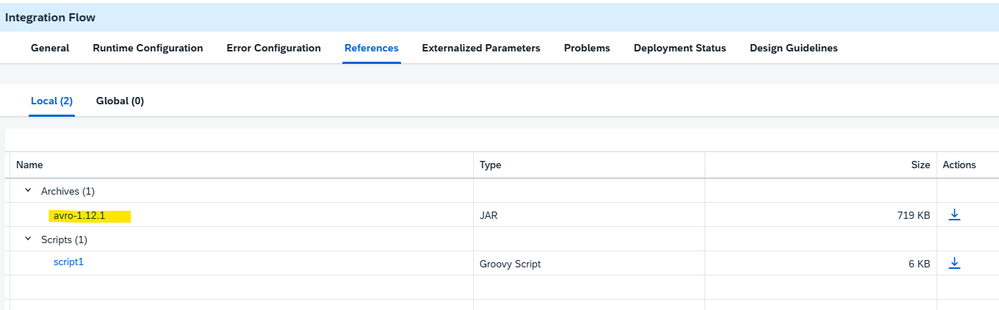
Required JAR: Upload avro-1.12.1.jar to the iFlow under Resources → Archives. Download from Maven Central.
The AVRO Schema
Store this as the avro externalized parameter:
{
  "type": "record",
  "name": "Order",
  "namespace": "com.example.sap",
  "fields": [
    { "name": "orderId",     "type": "string" },
    { "name": "customerId",  "type": "string" },
    { "name": "totalAmount", "type": "double" },
    { "name": "currency",    "type": "string" },
    { "name": "status",      "type": {
        "type": "enum",
        "name": "OrderStatus",
        "symbols": ["CREATED", "CONFIRMED", "CANCELLED"]
    }},
    { "name": "createdAt",   "type": "long" },
    { "name": "items",       "type": {
        "type": "array",
        "items": {
          "type": "record",
          "name": "OrderItem",
          "fields": [
            { "name": "sku",      "type": "string" },
            { "name": "quantity", "type": "int" },
            { "name": "price",    "type": "double" }
          ]
        }
    }}
  ]
}
Testing with a Base64 Sample
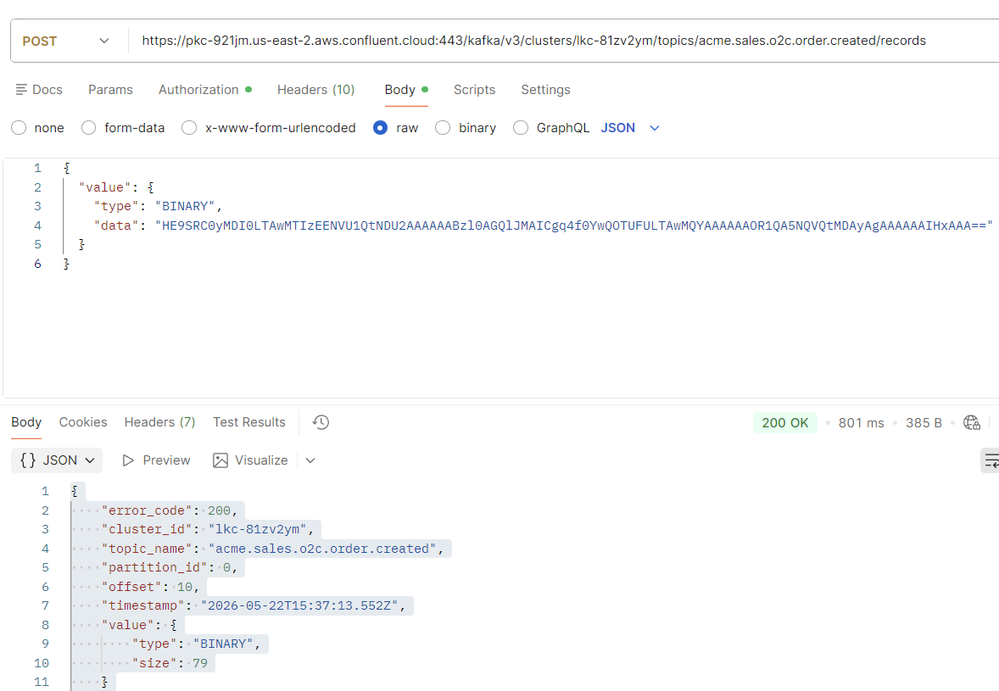
For local simulation without a live Kafka producer, encode a sample message as Base64 and inject it via a Content Modifier. Switch the input line in the script from message.getBody(byte[].class) to the Base64 decoder variant. The Confluent Wire Format detection (magic byte check) handles both paths automatically.
When This Pattern Is and Is Not Worth It
This pattern adds a layer of indirection. That layer earns its keep only when the domain is volatile.
| Domain Volatility | Recommended Design |
|---|---|
| Rare — 2–3 stable topics, no additions expected | One iFlow per topic — simpler, no VM overhead |
| Frequent — new events added regularly, topic naming evolves | Router + Value Mapping — zero deploy per new event |
| Unknown at project start | Router + Value Mapping — safe by default |
The question that drives the decision: “How often do new events appear in this domain?” If the answer is never, the router adds cost for no return. If the answer is regularly, every new event without a router requires a change request.
Key Takeaways
- One Kafka Sender Adapter can subscribe to all topics in a domain. The
kafka.TOPICheader carries the routing key. - Value Mapping is the metadata contract. New event type → one new row. No code. No deployment.
- The AVRO schema belongs outside the script. CPI Externalized Parameters make schema changes operationally cheap.
- Confluent Wire Format (magic byte
0x00+ 4-byte schema ID) is handled with a five-byte strip before deserialization. - The router iFlow is immutable. Every artifact inside the domain package can evolve independently without touching it.
This is the same governance principle that makes IDoc routing scalable in large landscapes — applied to event-driven architecture in SAP BTP Integration Suite.
Marcus Reyes
SAP BTP Integration Architect
Integration architect with a decade of experience designing event-driven landscapes on SAP BTP and SAP Cloud Integration. Advocates for governance-first patterns like SDIA and ODCP across large enterprise deployments.