OAuth 2.0 Authentication in SAP Cloud Integration: A Step-by-Step Guide
Learn how to implement OAuth 2.0 Client Credentials flow in SAP Cloud Integration, why Basic Auth falls short, and how to test with Postman.
Table of Contents
Authentication is foundational to any integration design. Getting it wrong does not just create a support ticket — it creates a security vulnerability that can expose credentials across your entire integration landscape. This guide covers how authentication works in SAP Cloud Integration, why Basic Authentication is insufficient for production use, and how to implement OAuth 2.0 correctly using the Client Credentials flow on SAP BTP.
Note: Sensitive fields in all screenshots have been masked to protect credential information.
Basic Authentication and Its Security Limitation
Basic Authentication is simple to understand: the client combines a username and password as username:password, encodes the value with Base64, and sends it in the HTTP Authorization header with every request.
Authorization: Basic <Base64-encoded-credentials>
In Postman, providing a client ID as the username and a client secret as the password automatically generates this header.
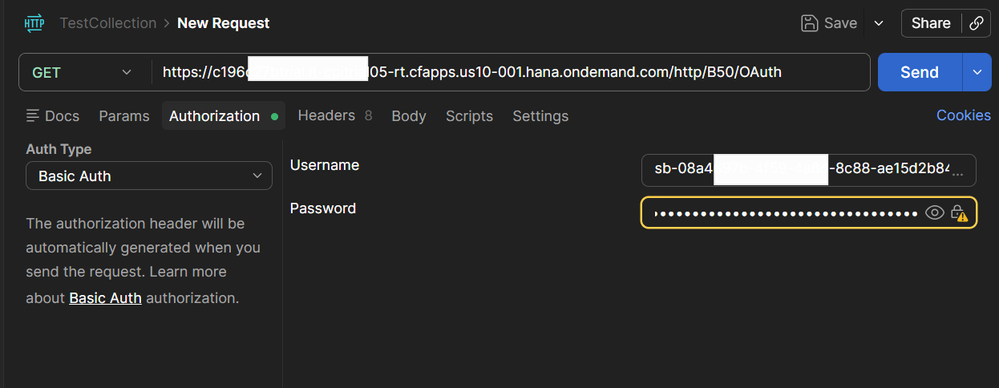
The critical problem: Base64 is an encoding mechanism, not encryption. If the HTTP request is intercepted at any point in transit, the Authorization header can be decoded immediately to reveal the original credentials in plain text — no special tools required.
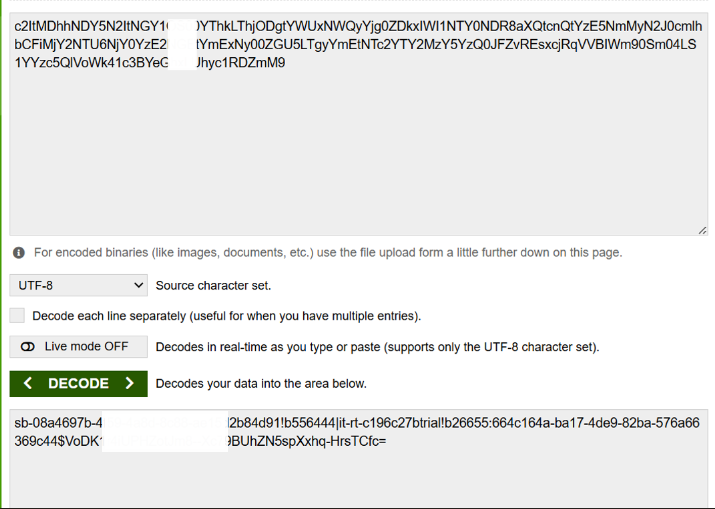
For integrations accessing protected SAP Cloud Integration endpoints, this makes Basic Authentication an inappropriate choice. OAuth 2.0 addresses the vulnerability by design.
What OAuth 2.0 Provides
OAuth 2.0 is a token-based authentication protocol. Instead of sending credentials with every request, the client authenticates with an authorization server once and receives a short-lived access token. That token is then used for all subsequent resource requests.
The three core elements:
| Element | Role |
|---|---|
| Client ID | Identifies the calling application |
| Client Secret | Authenticates the client with the authorization server |
| Access Token | Temporary credential used to access the resource endpoint |
The token has a defined expiration time — typically around one hour. Even if a token is intercepted, it becomes invalid automatically. Client credentials are sent exactly once, to the authorization server only, never to the resource endpoint itself.
The Client Credentials Flow
The OAuth 2.0 flow used for SAP Cloud Integration is the Client Credentials flow, designed specifically for system-to-system communication where there is no interactive user session.
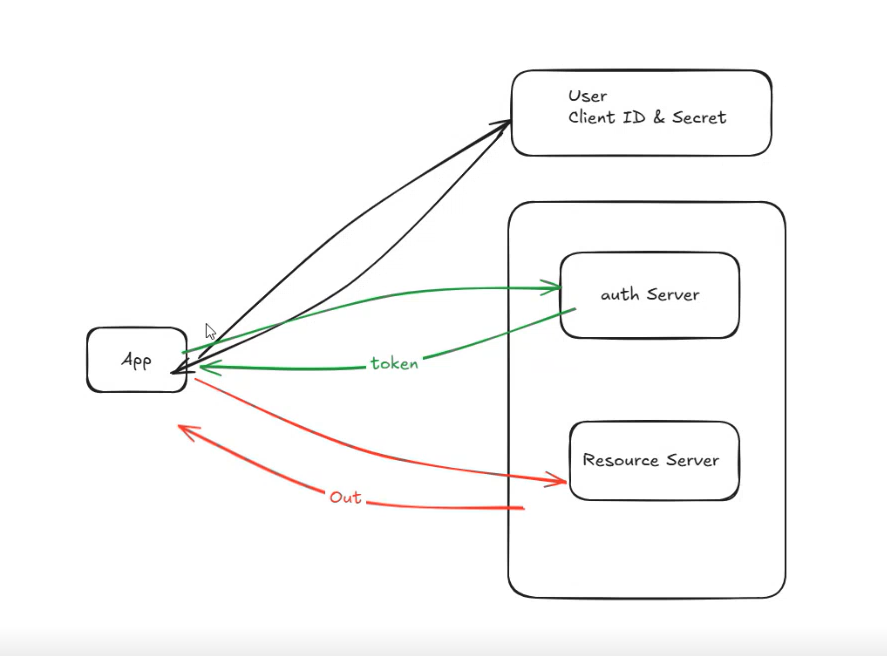
The sequence:
- The client sends its client ID and client secret to the authorization server
- The authorization server validates the credentials
- An access token is returned with an expiration time (
expires_in) - The client calls the Cloud Integration endpoint using the token
- The resource server validates the token and returns the requested data
The original credentials never travel to the Cloud Integration resource endpoint.
SAP BTP Endpoints and Credentials
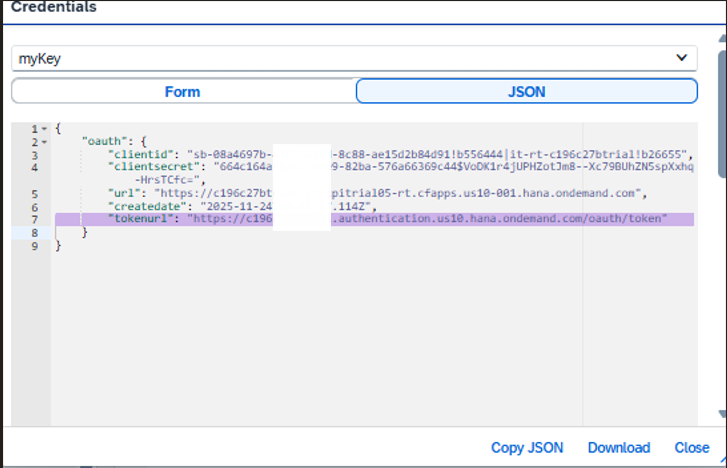
Three values from your SAP BTP service instance are needed to implement this flow.
Authorization Server URL (tokenurl):
https://<subaccount>.authentication.<region>.hana.ondemand.com/oauth/token
This endpoint receives the client credentials and issues the access token. The request uses:
grant_type=client_credentials
Cloud Integration Resource Endpoints:
https://<tenant>/http/...    (HTTP adapter iFlow endpoints)
https://<tenant>/cxf/...     (SOAP adapter iFlow endpoints)
All three values — clientid, clientsecret, and tokenurl — are available in your SAP BTP service instance credentials.
Token Generation
Once the authorization server validates the credentials, it returns a JSON response with the access token:
{
  "access_token": "eyJ0eXAiOiJKV1QiLC...",
  "token_type": "bearer",
  "expires_in": 3599,
  "scope": "uaa.resource ..."
}
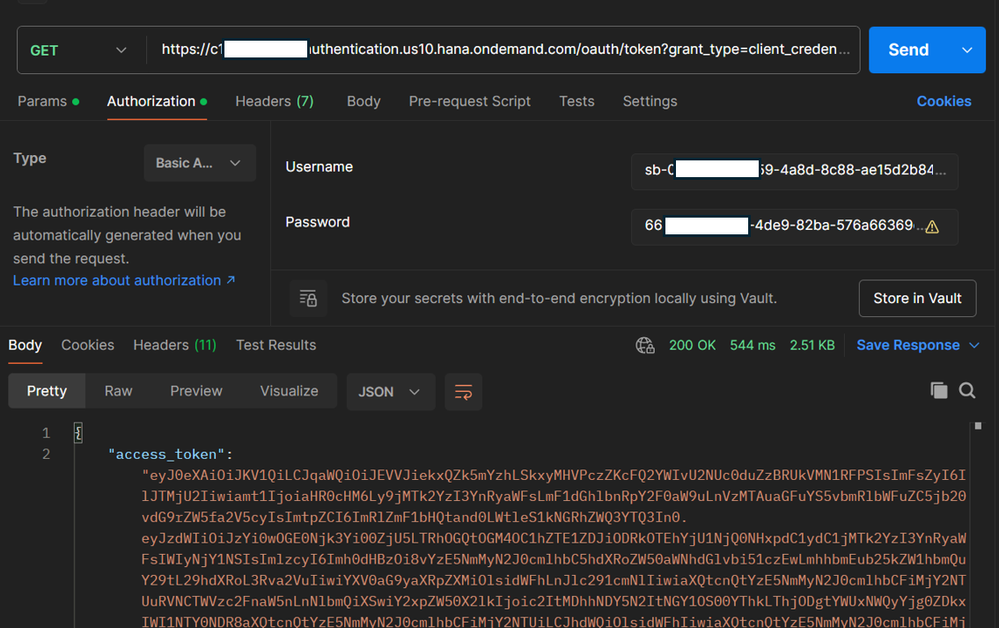
This token is then included in requests using the Bearer scheme — replacing the Basic Auth header entirely:
Authorization: Bearer <access_token>
The client secret is no longer sent when accessing the Cloud Integration resource.
Testing with Postman: Three Methods
Method 1 — Manual Bearer Token
Generate the token by calling the authorization server directly with Basic Auth (client ID + client secret). Copy the returned access_token and add it manually to the Authorization header of your resource request.
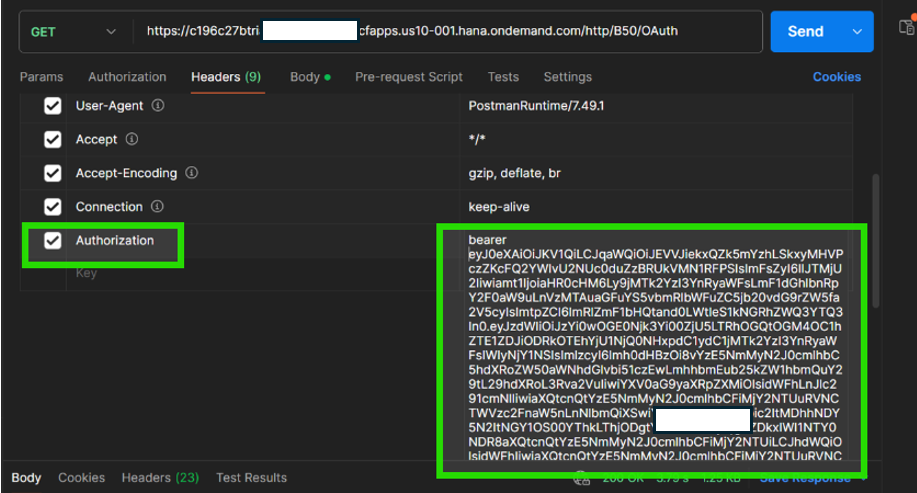
This method makes the two-step process explicit and is useful when learning or debugging the flow step by step.
Method 2 — Postman Bearer Token Type
Postman’s built-in Bearer Token authorization type simplifies token application. Paste the pre-generated token into the Token field and Postman constructs the Authorization header automatically.
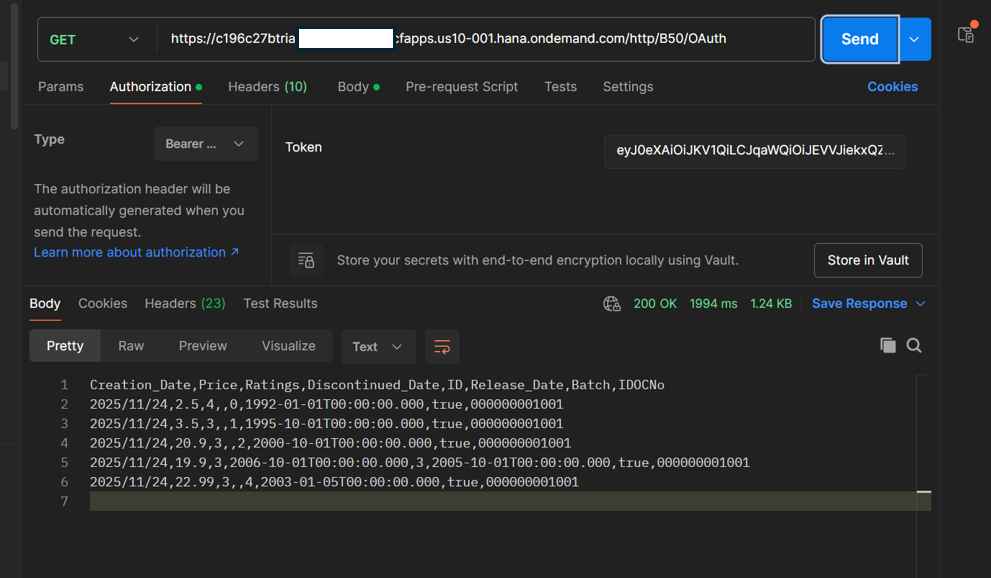
This is the right choice when a token is already available and you want a cleaner setup than editing raw headers.
Method 3 — OAuth 2.0 Configuration in Postman (Recommended)
The most efficient approach for development and repeated testing. Configure Postman to handle the full OAuth 2.0 flow automatically.
In the Authorization tab, set Type to OAuth 2.0, then fill in the Configure New Token section:
| Field | Value |
|---|---|
| Grant Type | Client Credentials |
| Access Token URL | tokenurl from BTP credentials |
| Client ID | clientid from BTP credentials |
| Client Secret | clientsecret from BTP credentials |
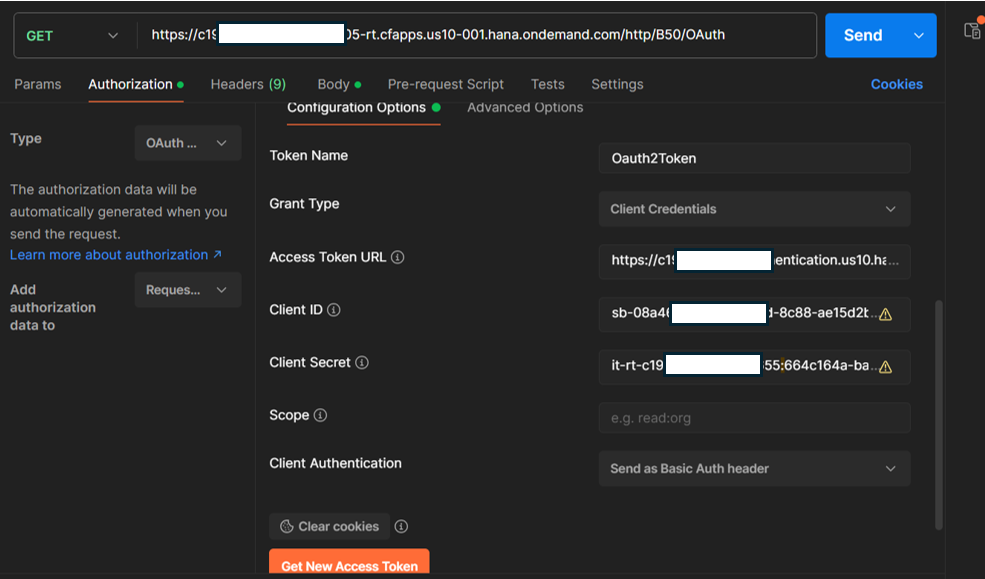
Click Get New Access Token. Postman sends the token request to the authorization server, validates, and presents the token.
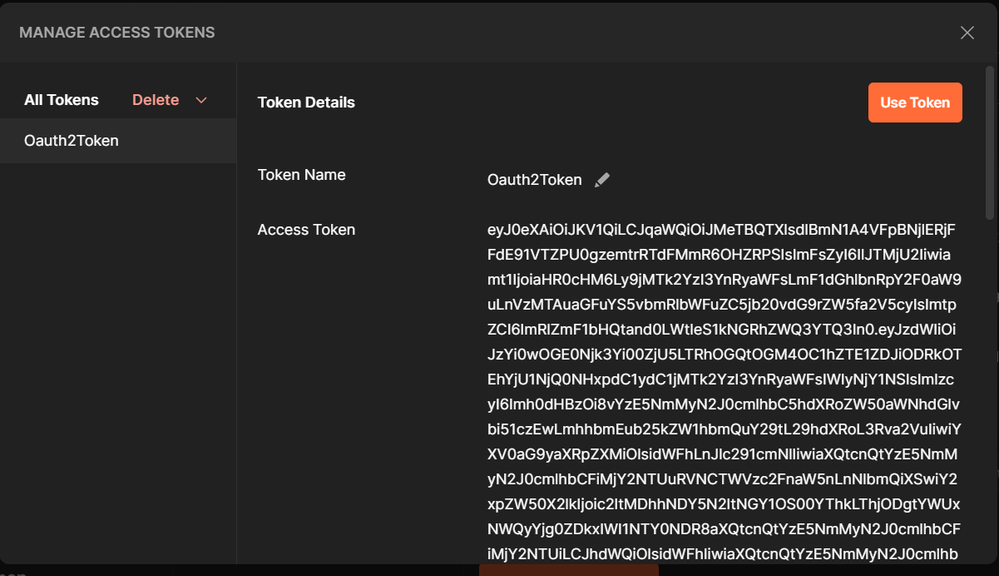
Click Use Token. Postman attaches the Bearer token to the request. On subsequent calls, Postman can auto-refresh the token before it expires, eliminating manual token management entirely.
This approach is the most practical for development because it avoids copying tokens manually on every expiry.
Best Practices and Security Considerations
Never expose credentials in shared documents or screenshots. Client IDs, client secrets, and access tokens should all be masked before sharing internally or publishing externally.
Always prefer OAuth 2.0 over Basic Authentication when the integration requires secure access to protected resources. The two-step token exchange means credentials are exposed minimally — once, to the authorization server only.
Account for token expiration during testing. A 401 response in development is often not a misconfiguration — the token has simply expired. Generate a fresh one and retry before debugging further.
Store credentials securely. In SAP BTP, use secure parameters or credential stores rather than hardcoding values. In Postman, use environment variables for token URLs, client IDs, and secrets so credentials do not appear in raw collection exports.
Conclusion
OAuth 2.0 is the appropriate authentication mechanism for SAP Cloud Integration. The Client Credentials flow exchanges credentials once with the authorization server, receives a short-lived token, and uses that token for all subsequent resource access — keeping credentials out of resource requests entirely.
This pattern applies equally to inbound integrations (external systems calling your iFlow endpoint) and outbound integrations (your iFlow calling an external API protected by OAuth 2.0). The flow is the same; only the configuration direction changes.
By replacing Basic Authentication with OAuth 2.0 and following the credential security practices above, integrations become measurably more secure and more aligned with enterprise security standards.
Priya Sharma
SAP Basis & Technical Specialist
Based in Bengaluru with expertise in SAP Basis administration, S/4HANA migrations, and system landscape design. Passionate about making technical SAP topics accessible.