Natural Language Automation for SAP Datasphere with GitHub Copilot
How datasphere-copilot lets you manage SAP Datasphere spaces, users, and task chains using plain English instead of CLI commands and JSON payloads.
Table of Contents
If you work with SAP Datasphere regularly, the official CLI is indispensable — but it demands precision. Getting command syntax exactly right, constructing JSON payloads, converting storage values to bytes, assigning user roles correctly, and being cautious with destructive operations all add friction that compounds quickly during active development phases when you are constantly creating feature spaces, deploying artifacts, and managing project access.
Earlier approaches — like using the SAP Data Intelligence CLI (vctl) alongside the Monitoring Query API — helped at the margins but always felt constrained in capability.
With SAP Datasphere and Business Data Cloud gaining real traction, an open-source alternative has emerged: datasphere-copilot, a custom GitHub Copilot agent that translates natural language directly into Datasphere CLI commands inside VS Code.
What the Agent Can Do Today
Instead of switching between documentation tabs and terminal, you describe what you need:
- “Create a new feature space called PROJECT_X_FINANCE with 10 GB quota and description for our current implementation project”
- “List all users in the tenant and show their assigned spaces and roles”
- “Check current space quotas for all spaces”
- “Deploy a local table named SALES_FACT with columns order_id, amount, and order_date”
- “Run the task chain DAILY_ETL in space ANALYTICS”
These are the requests that come up most often for architects and project leads: spinning up environments, auditing access rights, keeping multiple projects moving in parallel. Because the agent runs commands in the terminal, its output can also feed into custom agentic orchestration for task chains and deployments.
Architecture
The agent sits between the developer and the official @sap/datasphere-cli, using GitHub Copilot Chat in Agent Mode as the conversational interface.
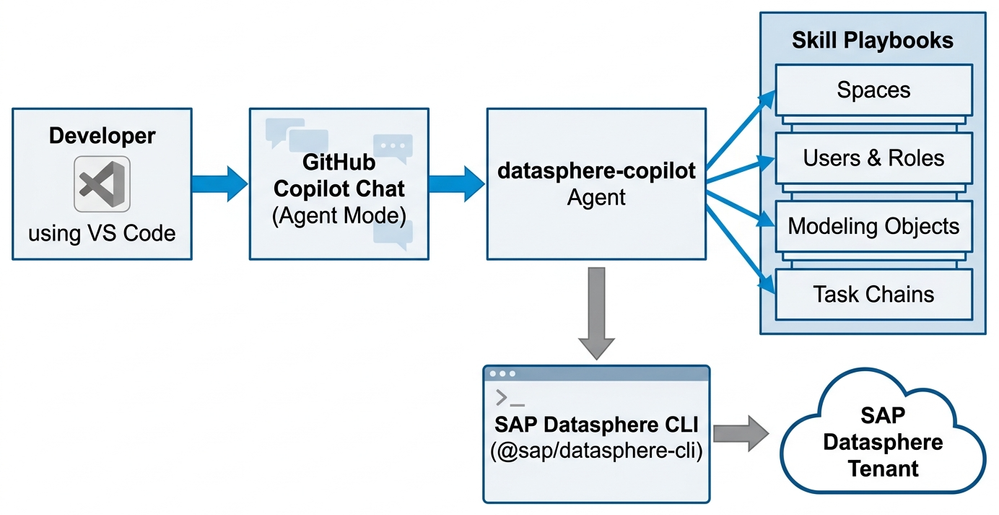
The key components:
- GitHub Copilot Chat (Agent Mode) — the conversational interface inside VS Code
- datasphere-copilot Agent — the central orchestrator that selects the appropriate skill
- Skill Playbooks — focused instruction sets covering spaces, users & roles, modeling objects (16+ types), and task chains
- SAP Datasphere CLI — executes operations directly against the tenant
Handling Complex Multi-Step Operations
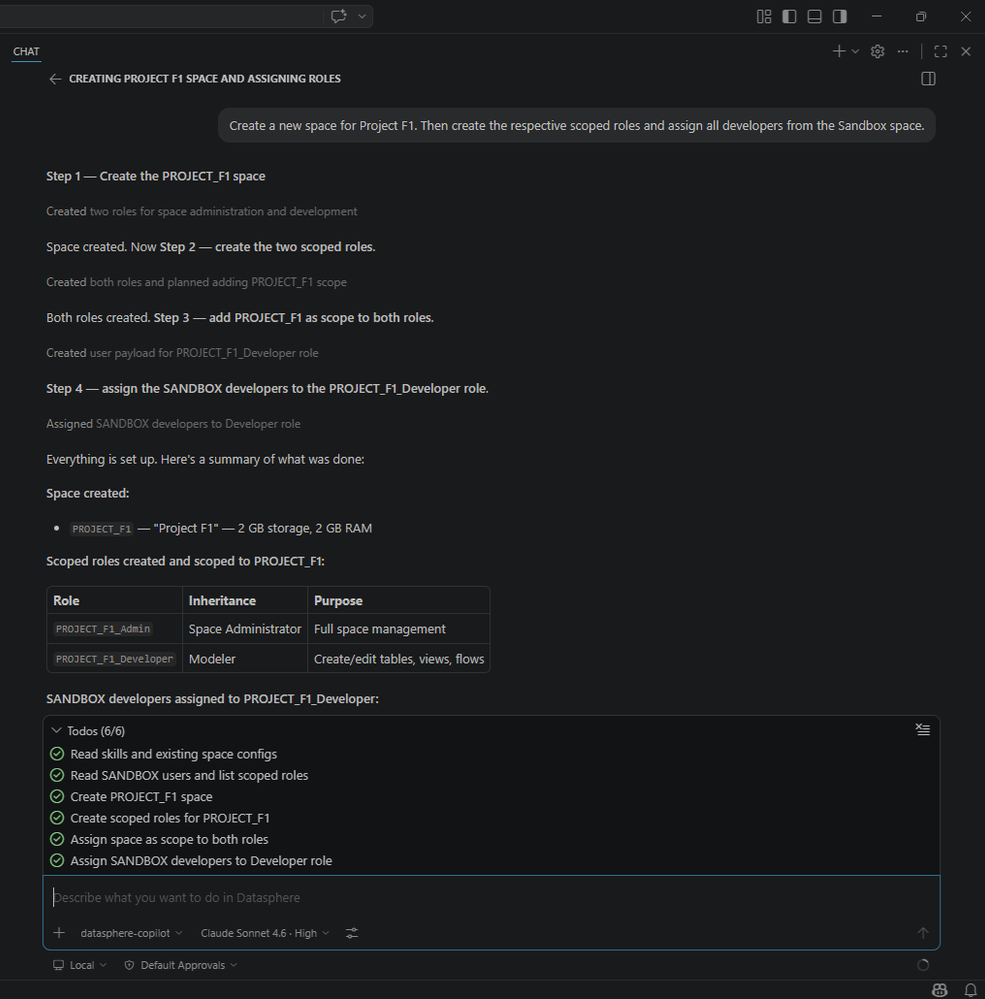
The real test of any natural language interface is how it handles instructions that require multiple sequential actions. A single prompt like “Create a new space for Project F1, create the scoped roles, and assign all developers from the Sandbox space” requires six distinct steps:
- Read existing skills and space configuration
- Read Sandbox users and list scoped roles
- Create the PROJECT_F1 space
- Create scoped roles for PROJECT_F1
- Assign space scope to both roles
- Assign Sandbox developer users to the Developer role
The phrase “all developers” is resolved by having the agent filter Sandbox users by role before making assignments — a level of reasoning that goes well beyond simple command generation.
How It Is Built
An earlier version of this tool used a regex-based intent mapper that operated entirely without an LLM. It handled a well-defined command set but was brittle and hard to extend. With today’s reliable language models, maintaining a strictly rule-based system no longer makes sense for this class of problem.
The current design focuses on clarity and extensibility:
- One central agent file orchestrates the workflow and skill selection
- 9 focused skill files (detailed playbooks) covering all major operational areas
- Automatic skill discovery — adding a new skill does not require modifying the core agent
- Safety-first design — read operations execute immediately; create and update operations show full results before committing; destructive actions (delete) always require explicit confirmation; credentials stay in
.env
Model Performance
The agent has been tested across multiple LLMs. Claude Sonnet 4.6 and GPT-5.3-Codex delivered the most consistent results for this type of code and command generation. Accuracy varies with complex multi-field payloads, and it is worth tracking premium request quota since different models and reasoning settings affect costs meaningfully.
What Is Coming Next
| Feature | Description |
|---|---|
| Multitenant support | Manage multiple tenants and cross-tenant references from one agent |
| Broader skill coverage | Instructions for remaining development artifact types |
| REST API + OData integration | Extend beyond the CLI to SAP’s official REST APIs and OData services |
| Team of Agents | Separate development, administration, and security personas working in parallel |
Getting Started
Prerequisites: VS Code 1.99+ (or Insiders), a GitHub Copilot licence, Node.js 18+, and the official @sap/datasphere-cli.
# 1. Clone and open in VS Code
git clone https://github.com/dsteffanov/datasphere-copilot
code datasphere-copilot

# 2. Set up credentials
cp .env.example .env
# Edit .env with your SAP Datasphere tenant URL and credentials

# 3. Open Copilot Chat → Agent Mode → select datasphere-copilot
Once the agent is selected, describe what you need in plain English. Star the repo if it is useful, open an issue for feature requests, or submit a PR to add new skills.
A Note on SAP Joule and MCP
SAP Joule is already well integrated into the modern SAP stack, though it has not been evaluated specifically for these kinds of administrative and development tasks. Many teams choose their AI coding assistant based on organisational licensing strategy — if your team is already on GitHub Copilot, this agent slots into that workflow directly.
Whether to introduce an MCP server is still an open question. It could improve tool discovery and make interactions smoother with Claude models, but would add infrastructure to maintain. For now the priority is keeping the solution lightweight and easy to adopt.
This is a daily-use tool that is still evolving. Feedback on new skills or real-world use cases is particularly valuable.
David Tan
SAP MM/SD Consultant
Jakarta-based SAP consultant specialising in supply chain modules MM and SD. Seven years of project experience across FMCG and logistics companies in Southeast Asia.